Real Estate CRM Integration: Capture, Route and Follow Up Every Lead
Plan a practical real estate CRM integration that captures enquiry context, assigns the right agent, supports timely follow up, and gives managers reliable pipeline visibility. This guide explains what to integrate, which fields to capture, how to design assignment and follow up rules, how to handle WhatsApp and advertising sources, what to test, and how to compare implementation options. It focuses on practical choices instead of presenting automation as a substitute for good sales work.
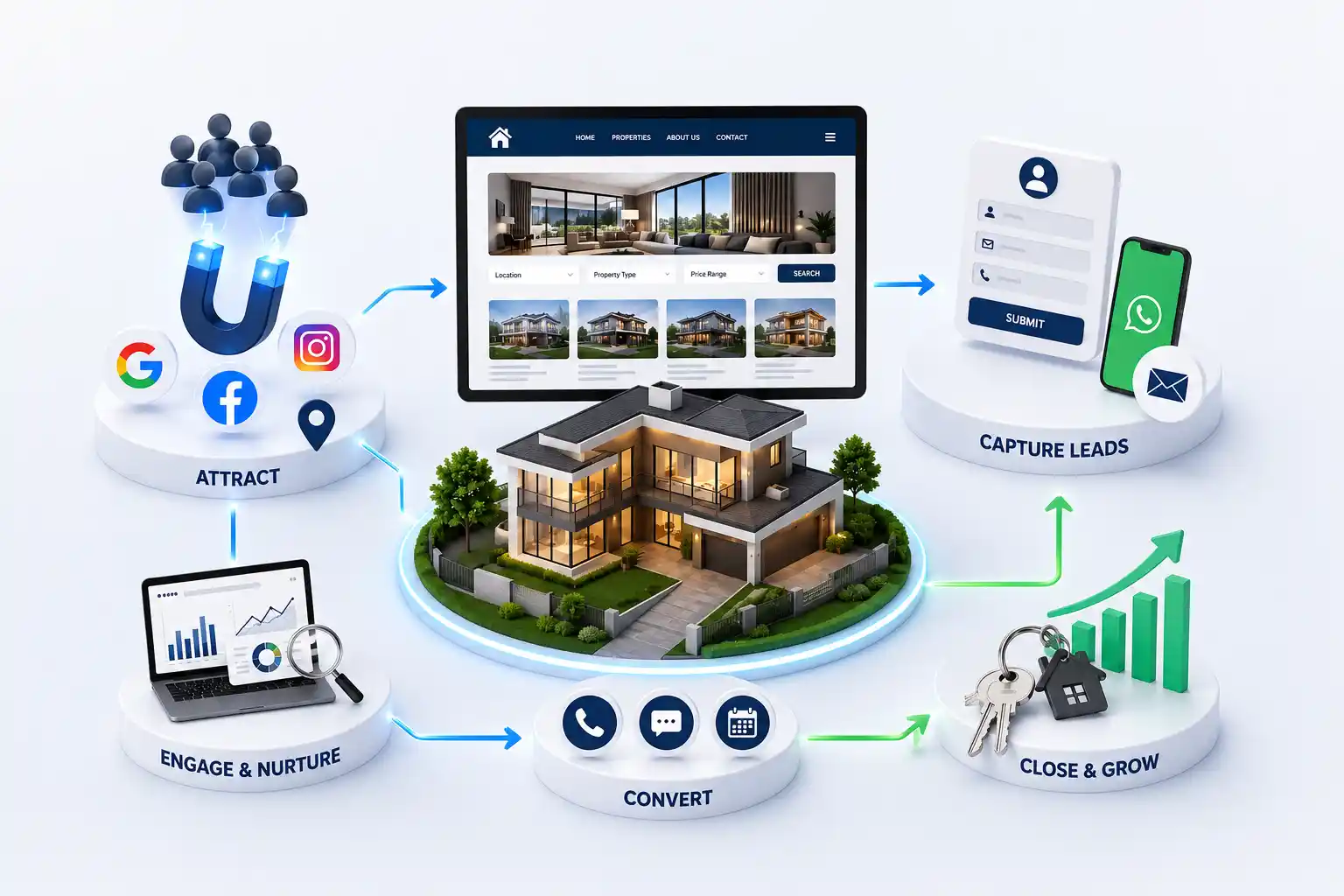
A property enquiry can arrive from a project page, Google campaign, Meta form, portal, phone call, or WhatsApp conversation. When each source lands in a different spreadsheet or inbox, agents receive incomplete context, duplicate prospects get contacted twice, and managers cannot see where genuine opportunities are being lost. Property decisions involve repeated conversations, document sharing, family discussions, finance questions, and site visits. A real estate CRM integration should preserve that journey from the first enquiry. It gives the sales team one reliable record while helping marketing understand which campaigns produce relevant conversations rather than merely form submissions.
This guide explains what to integrate, which fields to capture, how to design assignment and follow up rules, how to handle WhatsApp and advertising sources, what to test, and how to compare implementation options. It focuses on practical choices instead of presenting automation as a substitute for good sales work.
It is written for Indian brokers, channel partners, developer marketing teams, sales managers, and business owners evaluating a new CRM or trying to make an existing system dependable.
Start with the sales outcome, not the software
A CRM connection is useful only when it changes what happens after a prospect shows interest. Begin by mapping the current path from enquiry to qualification, meeting, site visit, negotiation, booking, or closure. Record where context disappears, who decides ownership, and which delays create confusion. This process often reveals that the hardest issue is not moving data. It is agreeing on one operating method across marketing, pre sales, field agents, and management.
Define a small set of outcomes before selecting connectors or custom development. A broker may need every website lead assigned with the project name and campaign source. A developer may need separate workflows for residential projects, commercial inventory, and channel partner referrals. Managers may need to distinguish an uncontacted lead from an unreachable lead. These requirements become acceptance criteria for the real estate lead management system.
Business questions to answer before CRM implementation
Question
Practical decision
Why it matters
What counts as a lead?
Define valid phone, intent, and consent
Prevents unusable records
Who owns it?
Set assignment and reassignment rules
Avoids disputed enquiries
What happens next?
Create task and escalation stages
Makes follow up visible
What proves quality?
Agree qualification fields
Connects marketing with sales
When is it closed?
Use clear outcome reasons
Improves future decisions
Capture complete lead context at the source
A name and phone number are not enough for useful property lead routing. Website forms should pass the page URL, project or locality, property type, budget band, preferred contact method, campaign parameters, timestamp, and consent state. Preserve the original source even when an agent later edits the record. For call and WhatsApp actions, use event tracking and a reference that identifies the listing or campaign that started the conversation.
Keep forms proportionate to intent. A person downloading a brochure may share fewer details than someone requesting a site visit. Required fields should help the next conversation, not satisfy every department at once. Validate phone formats, standardize city and project names, and reject empty automated submissions before they enter the CRM. If optional information is missing, store it as unknown rather than guessing.
Identity: name, verified phone where appropriate, and email when useful
Intent: project, locality, configuration, purpose, and budget band
Attribution: source, medium, campaign, landing page, and referral data
Contact preference: call window, WhatsApp choice, language, and consent
Operational context: submission time, assigned team, and duplicate status
Design routing, ownership, and deduplication rules
Routing should reflect how the business can actually respond. Common rules include project, geography, language, property type, budget, source, and current workload. Round robin assignment is simple when agents have similar skills and schedules. Named project teams are better when product knowledge matters. High value commercial enquiries may need a specialist queue. Document the order of rules so two conditions do not assign the same lead differently.
Ownership needs time boundaries. If an assigned agent does not acknowledge a new enquiry within the agreed period, create an alert or return it to a manager queue. Reassignment must preserve the history and tell the new owner what has already happened. Deduplication should compare normalized phone numbers and email addresses while retaining new campaign and project interest. Merging records must not erase a prospect who is actively considering two developments.
Illustrative routing rules for different enquiry types
Example enquiry
Suggested owner
Required context
Named project brochure
Project pre sales team
Project, campaign, language
Pune resale request
Local resale desk
Locality, budget, configuration
Office leasing enquiry
Commercial specialist
Area, size, move date
Existing prospect, new project
Current owner with alert
Previous history and new interest
Build a follow up workflow agents can use
Automation should prepare the human conversation, not imitate one. An immediate acknowledgement can confirm that the request was received, identify the project, and state when the team is available. The CRM should then create a task for the assigned agent. If the prospect prefers WhatsApp, use an approved template where required and keep the message specific. Repeated generic messages damage trust and make it harder to identify genuine replies.
Pipeline stages should describe observable progress. New, attempted, connected, qualified, site visit planned, visited, negotiating, won, and closed are easier to govern than vague labels such as warm. Add outcome reasons for invalid, no response, budget mismatch, location mismatch, postponed, and purchased elsewhere. Keep notes factual and concise. A manager should understand the last interaction, next action, owner, and due date without calling the agent.
Acknowledge the enquiry with project and contact context
Create an owner task with a clear due time
Record contact attempts without changing qualification prematurely
Capture requirements during the first meaningful conversation
Schedule visits and reminders with responsible participants
Close the record with a specific outcome and learning
Connect websites, ads, calls, and WhatsApp carefully
Each channel has different data and failure conditions. Website forms can send records through an application programming interface or webhook, but the site needs a safe fallback if the CRM is unavailable. Meta Lead Ads require field mapping, access management, and regular token checks. Google Ads attribution depends on consistent campaign parameters and, where appropriate, offline conversion imports. Call tracking needs clear disclosure and a way to associate the call with a campaign or page.
WhatsApp Business integration should separate approved outbound templates from agent conversations, preserve opt out choices, and avoid exposing every record to every user. Decide whether messages are stored in the CRM, linked from it, or summarized by agents. Test media, language, template status, number reassignment, and delivery failures. Vendor demonstrations often show the happy path; implementation quality becomes visible when a token expires or a duplicate arrives.
Protect data quality and measure the full pipeline
CRM data contains personal details and commercially sensitive notes. Give users only the access needed for their role, remove former staff promptly, use strong authentication, and review exports. Define how long inactive records are retained and how correction or deletion requests are handled. Consent language should match the intended communication. RERA information belongs with the relevant project record, while sensitive identity or financial documents need stricter storage than ordinary lead notes.
Measure operational health before attributing revenue. Track delivery failures, duplicates, unassigned leads, first action time, overdue tasks, qualification completion, visits, and closure reasons. Then compare campaigns using qualified opportunities and downstream outcomes, not only cost per form. Attribution will remain imperfect when buyers use several devices or return through direct calls, so combine system data with disciplined agent questions.
Local operating models differ. Compare implementation needs for Mumbai property teams, Bengaluru brokers, and Pune agencies. City pages should inform routing through real service coverage, not arbitrary location rules.
Compare implementation options and plan the rollout
A native connector can be suitable when the website platform, ad source, and CRM support the required fields and failure alerts. An integration platform can speed up common workflows but adds another subscription and dependency. Custom API work provides control for complex project data, ownership rules, or reporting, yet it requires maintenance. Avoid choosing solely on the first setup cost. Review ongoing administration, limits, logs, vendor support, data export, and the cost of changing systems later.
Roll out in a controlled sequence. Clean users and project records, define fields and stages, connect one important source, test with realistic enquiries, train a small group, and review exceptions. Add other sources after the first workflow is stable. Keep a reconciliation report during launch so the team can compare source submissions with CRM arrivals. Document manual fallback steps before an outage occurs.
Need a dependable website to CRM workflow?
We can map your enquiry sources, website fields, routing needs, and sales handoffs into a practical integration scope.
A successful real estate CRM integration makes responsibility visible. Every valid enquiry reaches a known owner with useful context, every important action has a next step, and managers can inspect the process without rebuilding it from spreadsheets. Start with a narrow dependable flow, learn from exceptions, and expand only when the team can operate the foundation consistently.
Real estate CRM integration connects enquiry sources and sales tools with a customer relationship management system. It can pass website forms, advertising leads, calls, WhatsApp context, project interest, consent, and campaign data into one record. A useful integration also assigns ownership, creates follow up tasks, records outcomes, and alerts the team when delivery fails.
Start with the source that produces important volume and currently creates the most manual work or lead loss. For many teams this is the property website or a major advertising form. Stabilize field mapping, routing, and reconciliation there before connecting portals, calls, WhatsApp, and smaller campaigns. Priority should reflect business value and operational pain, not novelty.
Yes, when assignment rules are clear. Leads can be routed by project, locality, language, budget, property type, source, availability, or a round robin queue. Automatic assignment still needs acknowledgement deadlines, manager alerts, leave handling, and a documented reassignment process. The history should remain visible whenever ownership changes.
Normalize phone numbers and email addresses, then compare new submissions with existing records. Preserve the latest source, campaign, project interest, and timestamp rather than discarding the event. Some duplicates should merge into one prospect history, while separate active requirements may need linked opportunities. Give managers a review path for uncertain matches.
Store enough context for continuity and accountability, subject to consent, access, and retention rules. Depending on the chosen tools, this may be a synchronized conversation, a link, delivery events, or concise agent notes. Avoid copying unnecessary personal content. Clearly define who can view messages and how opt out requests update future communication.
Not always. Native connectors can handle standard forms and fields, while integration platforms support many common workflows. Custom development becomes useful for complex project structures, specialized routing, strict validation, unusual reporting, or reliable fallback behaviour. Compare maintenance, logging, limits, support, data ownership, and switching cost before deciding.
Reconcile source submissions against CRM arrivals, then monitor failures, duplicates, unassigned leads, first action time, overdue tasks, qualification completeness, visits, and closure reasons. Run test enquiries regularly from each channel. Marketing and sales should jointly review whether campaign context survives and whether agents can act without searching another system.
Timing depends on source count, data quality, routing complexity, vendor access, approval speed, and custom work. A narrow website form connection can be implemented faster than a multichannel migration with historical data and several teams. Ask for phased milestones covering discovery, configuration, testing, training, launch, and support instead of one broad deadline.
Ask how they map the current sales process, validate fields, manage duplicates, secure credentials, handle outages, test attribution, document workflows, and train users. Request a clear scope showing systems, data directions, exclusions, responsibilities, acceptance tests, and ongoing support. Be cautious of guarantees about conversion because software cannot control buyer intent or agent performance.
Use this practical redesign checklist to diagnose an outdated property website, preserve search visibility, improve buyer journeys, strengthen enquiry quality, and plan a controlled launch with fewer migration risks.
Property listing websites with search, lead capture, and broker ready tools. Available for agencies and builders across major Indian cities. Every page is planned for stronger search visibility, faster performance, clearer customer journeys, and measurable enquiries.
My Perfect Solutions helps brokers, clinics, restaurants, and growing brands launch fast, SEO-ready websites that turn search traffic into qualified enquiries across India.